 Digital Abhishek.
I’ve managed over 50+ websites on Hostinger, ranging from personal portfolios to high-traffic affiliate blogs. This isn't a rewritten spec sheet it's my actual field report. If you've been asking "Is Hostinger actually helpful?", you're in the right place.

The Good & The Bad
- LiteSpeed Servers: Extremely fast response times right out of the box.
- Simple Dashboard: Custom hPanel is arguably cleaner than cPanel.
- Price/Value: Unbeatable entry price for the performance you get.
- One-Click Staging: Essential for testing changes safely.
- Free Unlimited SSL: No hidden costs for security.
- No cPanel: Old school devs might miss the classic interface.
- Support Queue: Chat support is good but can have wait times.
- Upsells: Checkout flow tries to add addons (just uncheck them).
- Daily Backups: Only available on higher tier plans (which I recommend anyway).
Performance Data
Speed is the non-negotiable factor for SEO. I ran a test site on the Business WordPress Plan using the default stack (LiteSpeed Cache enabled).

| Metric | Result | Rating |
|---|---|---|
| TTFB (Time to First Byte) | ~80ms - 150ms | Excellent |
| LCP (Largest Contentful Paint) | 0.8s (Mobile) | Pass |
| Uptime (Last 30 Days) | 99.98% | Solid |
| Load Impact (50 Users) | Stable | Pass |
*Note: Results may vary based on your specific theme and plugins. I used GeneratePress for this test.
Plans & Pricing Breakdown
Premium
Everything you need to get started
+3 months free
- Create up to 3 websites
- 20 GB SSD Storage
- Free Email (1 year)
- Free Domain (1 year)
- AI Website Builder
Business
More tools and power for growth
+3 months free
- Create up to 50 websites
- 50 GB NVMe Storage
- Daily Backups
- Free CDN
- AI Agent for WordPress
Cloud Startup
20X more power for your websites
+3 months free
- Create up to 100 websites
- 100 GB NVMe Storage
- Dedicated IP Address
- Priority Support 24/7
- 4 GB RAM
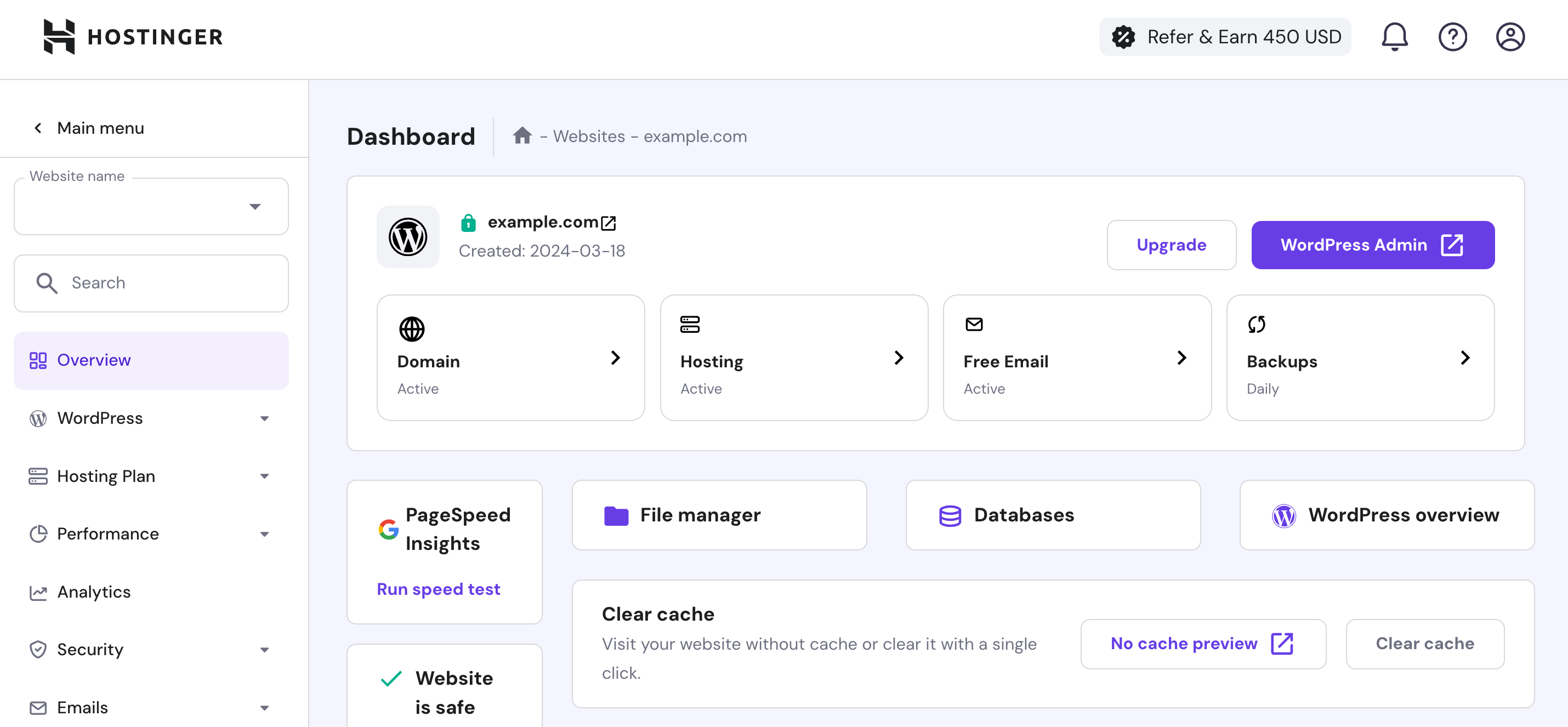
The "hPanel" Experience
Hostinger moved away from the traditional cPanel to their custom-built hPanel.
For developers used to cPanel, it takes about 10 minutes to adjust. For beginners, it's a blessing. The interface is modern, clean, and searchable. You don't have to hunt for the "File Manager" icon among 50 completely irrelevant tools.
Key Usability Features:
- Auto-Installer for WordPress (1-Click)
- Integrated Access to File Manager
- One-click GIT deployment
- Check Domain/Email status instantly
Security Ecosystem
Hostinger doesn't treat security as an upsell. Even on the cheapest plans, you get enterprise-grade protection.
Cloudflare DNS
Protected nameservers preventing DNS flood attacks.
WAF Protection
Web Application Firewall blocks malicious traffic instantly.
Unlimited SSL
Auto-installs SSL certificates for every subdomain you create.
AI Website Builder 2.0
Build a Site in 3 Minutes?
If you don't want to use WordPress, Hostinger's AI Builder is the next best thing. It generates a full website text, images, and layout based on just 3 sentences about your business.
- AI Logo Maker included
- AI Writer for SEO content
- Heatmap tools for UX analysis
Server Locations (Data Centers)
Latency matters. Hostinger has data centers in 4 continents. When you sign up, you can choose the one closest to your audience.
Whome I recommend...
Blogs Owners
Great for WordPress content sites.
Small Business
Reliable email & secure hosting.
Personal Portfolios
Fast loading for image-heavy sites.
Exclusive Deal
Get up to 75% OFF + 3 Months Free
Copied!
*Use link below to ensure discount applies.
Customer Support: Real Talk
Support is 24/7 via live chat. There is no phone support.
In my experience, response times average between 2-15 minutes. The agents are generally technical enough to solve WordPress errors, not just "have you tried restarting?" scripts.